
Location Permissions
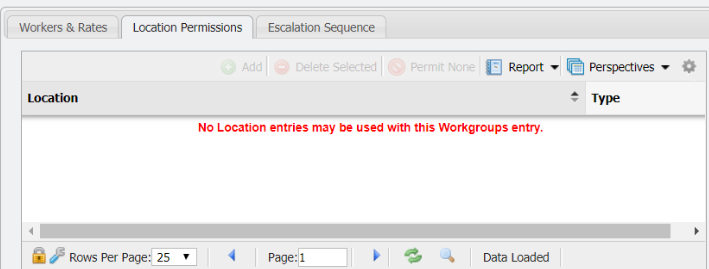
The 'Location Permissions' tab is on the Workgroups grid. The functionality of this tab allows an Admin to limit what Workgroup(s) can be assigned to a given Location.
Add
Using the 'Add' functionality a User can associate a Location Permission with a given Workgroup. This association will allow the Workgroup to be assigned tasks at a given Location.
-
Click the

-
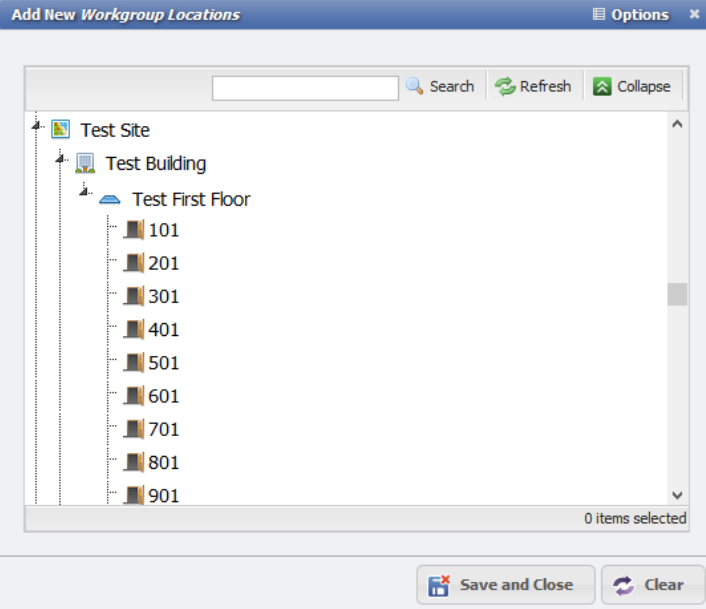
This will open the 'Add New Workgroup Locations' form.
-
Select the Location(s) that are desired to associate with the given Workgroup.
-
Click the

The Workgroup will now be associated with the given Location and be the only Location(s) that can be assigned to the given Workgroup elsewhere in PCR-360.
Delete Selected
This will remove a Location Permission from the given Workgroup record.
-
Select the Location Permission to remove from the grid.
-
Click the

-
The Permission on the current given Workgroup record will have been removed.
Permit None
This button disallows any associated Location Permissions from a given Workgroup. To use, simply click the 

To remove the 'Permit None' status follow these steps:
-
Select the line in the grid that says:

-
Click the

-
The Permit None restriction will have been removed and it will be possible to associate Location(s) with the given Workgroup again.