
-
On the Report a Problem form at help.pcr.com, enter the following information.
-
Enter a Summary of the bug being reported. This is a required field.
-
For example, "Big Red Oops error when closing a GLA".

Example of the Bug Summary
-
-
Enter the Description of what problem or bug is happening. This is a required field.

Example of the Bug Description -
Enter the Steps to Reproduce the bug. This is a required field and important so PCR can track the underlying cause of the bug.
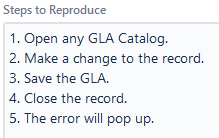
Example of the Bug Steps to Reproduce -
Enter the System where the bug happens. This is a required field.
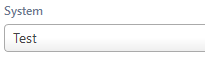
Example of the System drop down -
Enter the PCR-360 version into the Affects Version/s field. This is a required field.
-
To find the version click the

-
-
Any additional information can be entered into the remaining optional fields:
-
Impact
-
Any Attachments with screenshots of the bug.
-
-
Click the

button.
The bug ticket will be submitted to the PCR Helpdesk team to investigate the bug and look for a solution.