
Overview
Some PCR-360 functionality becomes inaccessible for Organizations using the Deny default Permission style of Permissioning. These features include:
-
WIki Access
-
Cabling Report
-
360 Search
-
Executing SQL Query (via AdHoc Grids)
How to Update Permissions
This is because these features do not have direct Menu/URL Access, and require some additional steps to grant access to when Permissions are denied by default.
-
Navigate to Admin > User Management > Permission Sets.
-
Open the desired Permission Set to update.
-
Click on the Pages/URLs tab.
-
Click the

-
Fill out the below form as follows:
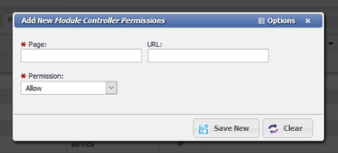
Page: core
URL: See the Blow Reference
Permission: Allow
-
Click the

Feature References
|
Functionality |
URL |
|---|---|
|
WIki Access |
wiki-help |
|
Cabling Report |
cabling-report |
|
360 Search |
360 |
|
Executing SQL Query |
sql-query |