Contacts
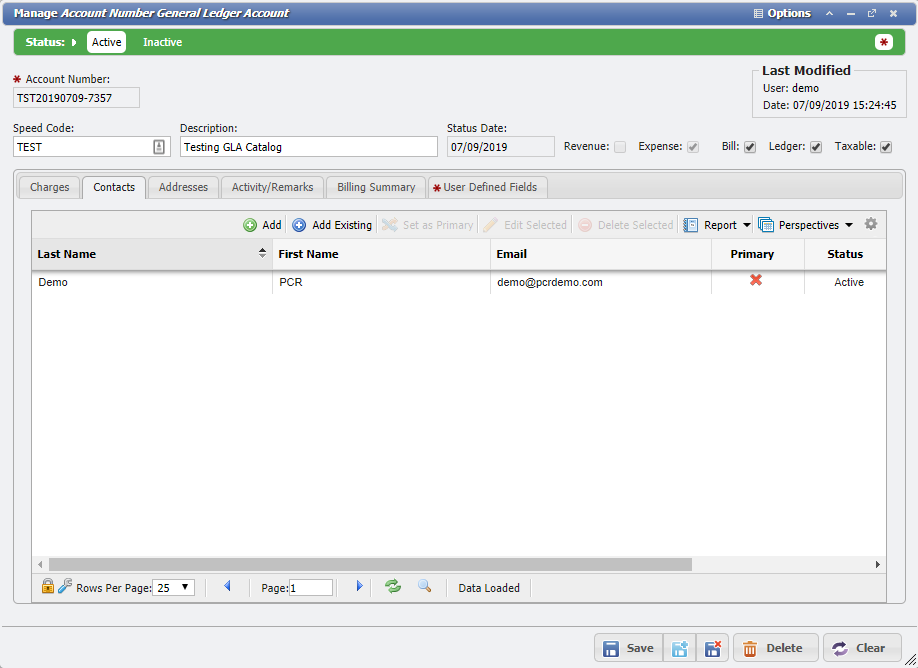
The Contacts tab provides the User the ability to manually associate Contacts with each GLA. These associated Contacts represent people who may be responsible for a given budget, or just assigned for billing purposes. These Contact(s) are separate entries in the Workers/Contacts section of the application and are associated with the GLA for tracking purposes.
The User can manually manage these associations by using the 'Add', 'Add Existing', and 'Delete Selected' functionality available on the Contacts tab.
Adding New Contacts
After clicking on the 
Adding Existing Contacts
After clicking the 
Set a Primary Contact
The Primary Contact is the person responsible for a given GLA and is required on GLAs. If the GLA is created without a Primary Contact, then when a Payment is created, the resulting Charge will not have an owner and cannot be billed. Primary Contacts are required for Service Fees. The Primary Contact is also used as the "Bill to" person on Invoices (although the address is actually the Billing address on the GLA). Setting this will route Billing to that Contact as well as aid in quick identification of the primary point of contact. Simply select the Contact that should be Primary and click the 
Note: There can only be one Primary Contact on any given record.
Edit Selected
Selecting the 
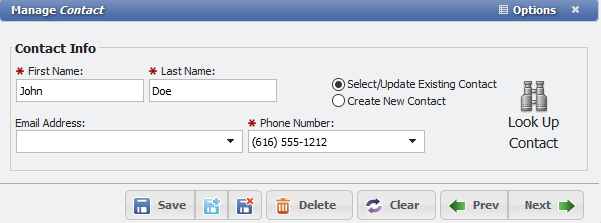
From here, the User can modify the information associated with the Contact and save the information back onto the grid.
Delete Selected
Selecting the