
Unknown Attachment
The 'Billing Group Overrides' tab is specific to the Charges Catalog allows a User to overrides the Revenue GLA, Revenue Object Code, and Expense Object Code based on the Billing Group. The default Revenue GLA, Revenue Object Code, and Expense Object Code on the Charge are what will be overridden when Billing for the Charge. A User can set multiple Overrides to account for different Billing Groups.
-
Click the

-
This will open the 'Add New Billing Group Overrides' form.
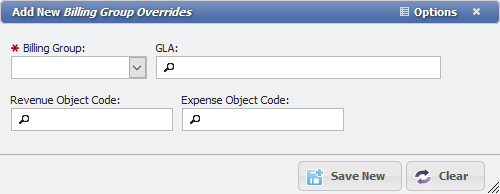
Add New Billing Group Overrides form example -
Choose the Billing Group, GLA, Revenue Object Code, and Expense Object Code.
-
Click the Unknown Attachment button.
The Billing Group Override will now show in the Grid on this tab. If multiple Billing Group Overrides are desired, simply repeat steps 1-4 until the desired Billing Group Overrides are in place.