
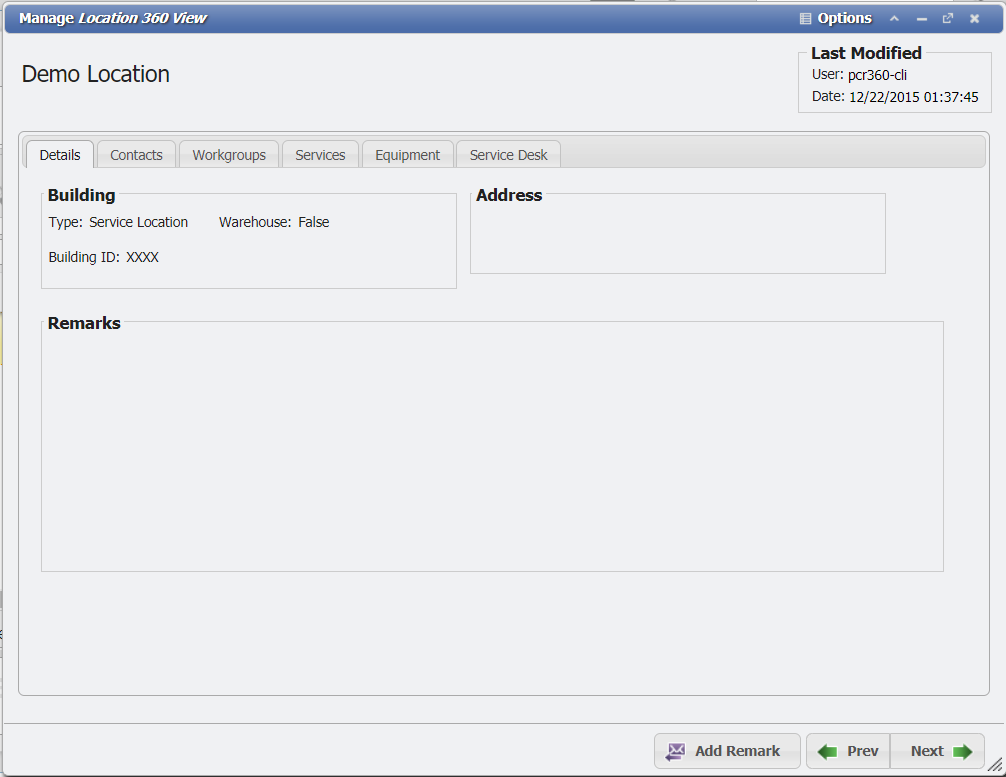
The 'Manage Location 360 View' form will provide the User with a 360 Degree view of a given Location. From this form, the User will be able to see the Location's 'Details' as well as all the 'Contacts', 'Workgroups', 'Services', 'Equipment', and 'Service Desk' items associated with the Location.
Buttons
-
The
-
The

-
The

Details
The 'Details' tab will show primary information like the 'Type', 'Warehouse', and any 'Remarks' associated with the Location.
Contacts
The 'Contacts' tab will list all the Contacts that are associated with the Location.
The 
Workgroups
The 'Workgroups' tab will show all of the Workgroups that are assigned to a given Location.
Services
The 'Services' tab will show all the Services associated with the Location.
The 
360 Search to see all Services at a Location
Sometimes it can be difficult to find all the Service records that are installed or assigned to a given Location. PCR-360 makes it easy to find everything related to given Location with the 360 Search. In this example, the Services in Desmet Hall are unknown. To find them the User should follow these steps:
-
In the upper right navigation select the Unknown Attachment button.
-
This will expand the 360 Search bar.
Unknown Attachment
-
Type in the text "Desmet Hall" (or the name of the Location that needs to be searched) and hit enter.
Unknown Attachment
-
The search will begin and when it is finished will have returned a set of all the results where the string "Desmet Hall" was matched.
-
For this example select the 'Location' tab, (if there are multiple tabs returned) and double click the Desmet Hall record.
Unknown Attachment
-
This will open the 'Manage Location 360 View' form. Select the 'Services' tab.
Unknown Attachment
This tab will now display all the Services that are assigned to this Location. The Services will display here regardless of if they are Active or Inactive, and all Service Types will appear as well.
The 
The 
The 
Equipment
The 'Equipment' tab will show all the Equipment associated with the Location.
The 
The 
Service Desk
The 'Service Desk' tab will show all the Service Desk items that are associated with the Location.
The User can click the 