
Trunks
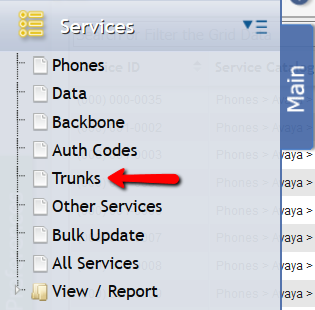
Trunk Services are identical to Other Services with only one exception. To customers who utilize the Service Desk portion of the application, it is recommended that all new Services be added via Service Desk to record a complete audit trail of the provisioning process. The unique service identifier is called 'Trunk ID' instead of 'Service ID'.
Navigate to Main > Services > Trunks and the following should be visible:

Trunks Service Tabs
When a Service is of the Trunk type, it has the standard set of tabs on the form. The 'Tabs' associated with Trunk Services are Charges, Expense GLAs , Billing , Equipment, Cabling, Pools, Contacts, Remarks, Activity, Attachments, User Defined Fields .
Adding a new Trunk
![Add_new_trunk_form[1].png](/__attachments/a_da8ac662a8780dcbc48e2714ee02255f8f786b3ce967d05dfb453bcfe97d69cd/Add_new_trunk_form%5B1%5D.png?cb=5366814afdf919c759d67f27e8c2224b)
To Add a Trunk, click the 
A User can add Charges, Equipment, Contacts, Expense GLAs, Cabling, Pools, Remarks, Activity, and Attachments.
Editing a Trunk
A User can select a Trunk, and then click the 
Delete a Trunk
A User can select a Trunk and then click the 
Print
A User can print the information related to a single Trunk by selecting the Trunk desired and clicking the 


If the PDF is selected, the User can then manipulate it in all the ways that a typical PDF is used.